Description: Meta Pixel + Conversions API + GA4 + Microsoft Clarity — from Sandbox Testing to Production Deployment Image: [https://genzfrontir.com/news/images/73971B14-FD52-47F2-82A6-F66B20EA2ACF.jpeg]
Website analytics শুধু একটি tracking script বসিয়ে শেষ হয়ে যায় না।
একটি production website-এ marketing attribution, conversion measurement, behavioural analytics এবং server-side event delivery সঠিকভাবে করতে হলে প্রথমে একটি পরিষ্কার event architecture, তারপর browser tracking, server tracking, validation, deduplication, privacy controls এবং production monitoring তৈরি করতে হয়।
 এই guide-এ আমরা একটি বাস্তব developer workflow অনুসরণ করব:
Planning → Sandbox → Event Schema → Meta Pixel → Meta Conversions API → Deduplication → GA4 → Measurement Protocol → Microsoft Clarity → Validation → Debugging → Privacy → Production
এই guide-এর লক্ষ্য হলো: Introduced একজন developer যেন শুধু copy-paste tutorial অনুসরণ না করে বুঝতে পারে কোন data কোথায় যাচ্ছে, কেন যাচ্ছে, কীভাবে validate করতে হবে এবং production-এ tracking ভুল হলে কীভাবে diagnose করতে হবে।
⸻
Table of Contents
- What You Will Build
- Why Four Tracking Systems?
- Browser vs Server-Side Tracking
- Recommended Tracking Architecture
- Sandbox Environment
- Tracking Specification
- Event Naming Strategy
- Event Data Contract
- Meta Pixel
- Meta Conversions API
- Pixel + CAPI Deduplication
- CAPI Credentials & Security
- Meta Test Events
- GA4 Setup
- GA4 Event Architecture
- GA4 Measurement Protocol
- Measurement Protocol Validation
- Microsoft Clarity
- Clarity Privacy & Masking
- Consent Management
- Google Tag Manager
- Unified Event Mapping
- Complete Purchase Flow
- Testing Strategy
- Troubleshooting
- Production Deployment
- Monitoring
- SEO & Sitemap
- Security Checklist
- Final Launch Checklist
- Official Documentation
- FAQ
- Final Verification
⸻
- What You Will Build
শেষে আমাদের tracking architecture হবে:
                     WEBSITE
                        │
          ┌─────────────┼─────────────┐
          │             │             │
          ▼             ▼             ▼
     Meta Pixel        GA4       Microsoft Clarity
          │             │             │
          │             │             │
          └─────────────┼─────────────┘
                        │
                   EVENT LAYER
                        │
                        ▼
                     BACKEND
                        │
              ┌─────────┴─────────┐
              │                   │
              ▼                   ▼
         Meta CAPI       GA4 Measurement
                              Protocol
              │                   │
              ▼                   ▼
         Meta Events           GA4
           Manager
এই architecture-এর উদ্দেশ্য:
- browser-side marketing events সংগ্রহ করা
- server-side conversion events পাঠানো
- browser এবং server event duplicate না করা
- GA4-এ analytics ও conversion measurement করা
- Clarity দিয়ে user behaviour বোঝা
- test environment-এ production-এর আগে সব validate করা
- sensitive credentials browser-এ না পাঠানো
- privacy এবং consent requirements বিবেচনা করা
⸻ Meta Pixel, CAPI, GA4 2. কেন Meta Pixel, CAPI, GA4 এবং Clarity একসঙ্গে?
চারটি tool একই কাজ করে না।
Tool Primary Purpose Meta Pixel Meta advertising-এর জন্য browser-side events Meta CAPI Meta-তে server-side event delivery GA4 Website/app analytics Microsoft Clarity Behavioural analytics, recordings, heatmaps Google Tag Manager Optional tag/event management layer
সহজ ভাষায়
Meta Pixel জিজ্ঞেস করে:
Facebook/Instagram advertising থেকে কী ধরনের website actions হচ্ছে?
Meta CAPI জিজ্ঞেস করে:
Server-side conversion data কীভাবে Meta-তে reliably পাঠাব?
GA4 জিজ্ঞেস করে:
Website users কী করছে এবং traffic/conversion behaviour কেমন?
Clarity জিজ্ঞেস করে:
User website-এর interface-এর সঙ্গে বাস্তবে কীভাবে interact করছে?
এই কারণে এগুলোকে competitor হিসেবে না দেখে complementary systems হিসেবে দেখা উচিত।
⸻
- Browser Tracking বনাম Server Tracking
এটি পুরো architecture বোঝার জন্য সবচেয়ে গুরুত্বপূর্ণ concept।
Browser-side
User ↓ Browser ↓ Website JavaScript ↓ Tracking Platform
উদাহরণ:
Browser → Meta Pixel Browser → GA4 Browser → Clarity
Browser tracking দ্রুত implement করা যায়, কিন্তু browser environment-এর ওপর নির্ভর করে।
⸻
Server-side
User ↓ Website ↓ Backend ↓ Tracking API ↓ Platform
উদাহরণ:
Backend → Meta CAPI Backend → GA4 Measurement Protocol
Server-side tracking-এর advantage হলো গুরুত্বপূর্ণ business events—যেমন confirmed order—backend-এর authoritative state থেকে পাঠানো যায়।
কিন্তু এর অর্থ এই নয় যে server-side tracking সবসময় browser tracking-এর replacement।
অনেক ক্ষেত্রে দুটিকে একসঙ্গে এবং সঠিকভাবে deduplicate করে ব্যবহার করা হয়।
⸻
- Recommended Tracking Architecture
একটি ecommerce website ধরুন।
User:
Landing Page ↓ Product View ↓ Add to Cart ↓ Checkout ↓ Payment ↓ Order Confirmation
Tracking:
Landing Page ├── Meta PageView ├── GA4 page_view └── Clarity session Product ├── Meta ViewContent ├── GA4 view_item └── Clarity behaviour Cart ├── Meta AddToCart └── GA4 add_to_cart Checkout ├── Meta InitiateCheckout └── GA4 begin_checkout Confirmed Order ├── Meta Pixel Purchase ├── Meta CAPI Purchase └── GA4 purchase
এখানে সবচেয়ে গুরুত্বপূর্ণ বিষয়:
একটি confirmed purchase-এর জন্য browser এবং server দুই জায়গা থেকে event গেলেও সেটি একই conversion হিসেবে identify করতে হবে।
⸻
- Sandbox Environment তৈরি করুন
Production tracking-এর আগে staging environment ব্যবহার করা সবচেয়ে ভালো practice।
ধরুন:
Environment Example Local localhost Staging staging.example.com Production example.com
Architecture:
Developer ↓ Local ↓ Staging ↓ Validation ↓ Production
কেন Sandbox দরকার?
কারণ development-এর সময় আপনি:
- test purchase করতে পারেন
- event বারবার fire করতে পারেন
- invalid parameter পরীক্ষা করতে পারেন
- API error দেখতে পারেন
- duplicate event তৈরি করতে পারেন
- consent behaviour পরীক্ষা করতে পারেন
এগুলো production advertising data-এর মধ্যে মিশিয়ে দেওয়া উচিত নয়।
⸻
- Tracking Specification তৈরি করুন
Tracking implementation শুরু করার আগে event list লিখে ফেলুন।
এটিকে বলা যায়:
Tracking Plan
উদাহরণ:
User Action Internal Event Meta GA4 Page opened page_view PageView page_view Product opened product_view ViewContent view_item Cart added cart_add AddToCart add_to_cart Checkout started checkout_start InitiateCheckout begin_checkout Order completed purchase Purchase purchase Signup signup CompleteRegistration sign_up Lead submitted lead Lead generate_lead
এখানে internal event name রাখা গুরুত্বপূর্ণ।
কারণ ভবিষ্যতে Meta বা GA4-এর naming পরিবর্তন হলেও তোমার internal tracking architecture একই থাকতে পারে।
⸻
- Event Naming Strategy
একটি event-এর তিনটি identity ভাবুন:
Internal Event │ ├── Meta Mapping │ └── GA4 Mapping
উদাহরণ:
internal: purchase_completed Meta: Purchase GA4: purchase
এতে analytics architecture পরিষ্কার থাকে।
⸻
- Event Data Contract
শুধু event name যথেষ্ট নয়।
একটি purchase event-এর data contract হতে পারে:
Field Purpose event_name কী ঘটেছে event_id Event identity timestamp কখন ঘটেছে order_id Business transaction value Conversion value currency Currency product_id Product identity quantity Quantity page_url Event source environment staging/production
দুইটি ID আলাদা করে বুঝুন
Order ID
Business system-এর order identity।
Event ID
Tracking system-এর event identity।
দুটিকে একই জিনিস ধরে নেওয়া উচিত নয়।
⸻
- Meta Pixel Setup
Meta-এর official ecosystem-এ website event tracking-এর জন্য Pixel/Dataset এবং Events Manager ব্যবহার করা হয়। Meta browser-side Pixel-এর পাশাপাশি Conversions API ব্যবহার করার approach-ও document করে।
Step 1 — Meta Business Environment
আপনার website-এর জন্য একটি appropriate Meta Business environment থাকতে হবে।
তারপর Events Manager-এ website data source configure করতে হবে।
Step 2 — Web Data Source
Web data source তৈরি করার সময় Pixel/Dataset identifier পাওয়া যাবে।
এই identifier browser implementation-এ ব্যবহার করা যায়।
Step 3 — Base Tracking
Website-এ Meta Pixel-এর base implementation যুক্ত করুন।
তারপর browser থেকে একটি test visit করুন।
Step 4 — Verify
Browser developer tools এবং Meta Events Manager—দুই জায়গা থেকেই verification করুন।
⸻
- Meta Pixel কী Track করবে?
সব website-এর event একই হবে না।
Ecommerce example:
PageView ViewContent Search AddToCart InitiateCheckout Purchase
Lead-generation website:
PageView ViewContent Lead CompleteRegistration
Content website:
PageView ViewContent Search
অর্থাৎ tracking plan business model অনুযায়ী তৈরি করতে হবে।
⸻
- Meta Conversions API
Meta CAPI-এর মূল ধারণা:
Website ↓ Backend ↓ Meta Conversions API ↓ Meta Events Manager
Browser থেকে event পাঠানোর পরিবর্তে backend event পাঠাতে পারে।
এটি বিশেষভাবে useful যখন event-এর authoritative state backend-এ তৈরি হয়।
উদাহরণ:
Payment Gateway ↓ Backend confirms payment ↓ Order = paid ↓ Server sends conversion event
এখানে backend জানে payment সত্যিই confirmed হয়েছে কিনা।
⸻
- CAPI-এর জন্য Credential Architecture
CAPI implementation-এ সাধারণত একটি Pixel/Dataset identifier এবং server-side authentication credential প্রয়োজন হয়।
সবচেয়ে গুরুত্বপূর্ণ security rule:
Public Identifier ↓ Browser-এ থাকতে পারে Secret Credential ↓ Server-only
কখনো করবেন না
- access token frontend JavaScript-এ রাখবেন না
- HTML source-এ রাখবেন না
- Git repository-তে commit করবেন না
- URL parameter-এ রাখবেন না
- browser localStorage-এ রাখবেন না
- public documentation-এ real token দেবেন না
Recommended
Secret Manager ↓ Backend ↓ CAPI
⸻
- Meta Pixel + CAPI কেন একসঙ্গে?
ধরুন একটি purchase হলো।
Browser:
Purchase event_id = EVT-1001
Server:
Purchase event_id = EVT-1001
Meta-এর event processing architecture-এ browser এবং server event-এর identity correctly configured থাকলে একই action duplicate conversion হিসেবে count হওয়া এড়ানো যায়।
⸻
- Event Deduplication
এটি tracking implementation-এর critical অংশ।
Incorrect
Browser Purchase event_id = browser-123 Server Purchase event_id = server-999
দুটি event একই order-এর হলেও identity আলাদা।
⸻
Correct Concept
            Purchase
                │
         event_id = EVT-1001
                │
        ┌───────┴───────┐
        │               │
     Browser          Server
        │               │
     Pixel             CAPI
        │               │
        └───────┬───────┘
                ▼
             Meta
এখানে event identity design implementation-এর আগে ঠিক করতে হবে।
⸻
- Event ID কোথা থেকে আসবে?
Production ecommerce system-এ event identity generate করার জন্য একটি deterministic strategy দরকার।
উদাহরণ:
Order: ORD-2026-10001 Purchase Event: EVT-ORD-2026-10001
কিন্তু প্রতিটি event-এর ক্ষেত্রে business ID সরাসরি event ID হিসেবে ব্যবহার করা বাধ্যতামূলক নয়।
মূল উদ্দেশ্য:
একই logical event browser এবং server দুই পথ দিয়ে গেলে platform যেন বুঝতে পারে এগুলো একই event।
⸻
- Meta Test Events
Production launch-এর আগে Meta Events Manager-এর Test Events workflow ব্যবহার করে event delivery পরীক্ষা করুন।
Test flow:
Staging Website ↓ Test Action ↓ Browser Event ↓ Server Event ↓ Meta Test Events
Test করার সময় যাচাই করুন:
- event received?
- correct event name?
- correct event ID?
- correct value?
- correct currency?
- correct source?
- browser/server event সম্পর্কিত?
- duplicate হচ্ছে কি?
⸻
- Meta Testing Example
ধরুন staging-এ একটি test purchase:
Environment: STAGING Order: TEST-10001 Event: Purchase Value: 1000 Currency: BDT Event ID: TEST-EVENT-10001
তারপর expected result:
Meta Test Events │ ├── Purchase received ├── Event parameters visible └── Browser/server behaviour verified
এখানে real customer’s data ব্যবহার করবেন না।
⸻
- GA4 Setup
GA4-এর জন্য প্রথমে:
Google Account ↓ Analytics Property ↓ Web Data Stream ↓ Measurement ID ↓ Website
Google tag বা Google Tag Manager-এর মাধ্যমে website measurement implement করা যায়।
Google-এর official Google tag documentation implementation এবং Tag Assistant verification workflow document করে।
Google tag — Official Developer Documentation
⸻
- GA4 Event Architecture
GA4-এ event-driven model ব্যবহার করা হয়।
উদাহরণ:
page_view view_item add_to_cart begin_checkout purchase sign_up generate_lead
প্রতিটি event-এর সঙ্গে relevant parameters থাকতে পারে।
Purchase:
purchase ├── transaction_id ├── value ├── currency └── items
Product view:
view_item └── items
⸻
- GA4 Key Events
সব event conversion নয়।
উদাহরণ:
page_view
সাধারণ analytics event।
কিন্তু:
purchase generate_lead sign_up
business outcome হতে পারে।
তাই GA4-এ business-important events-কে appropriate Key Event হিসেবে configure করা যায়।
⸻
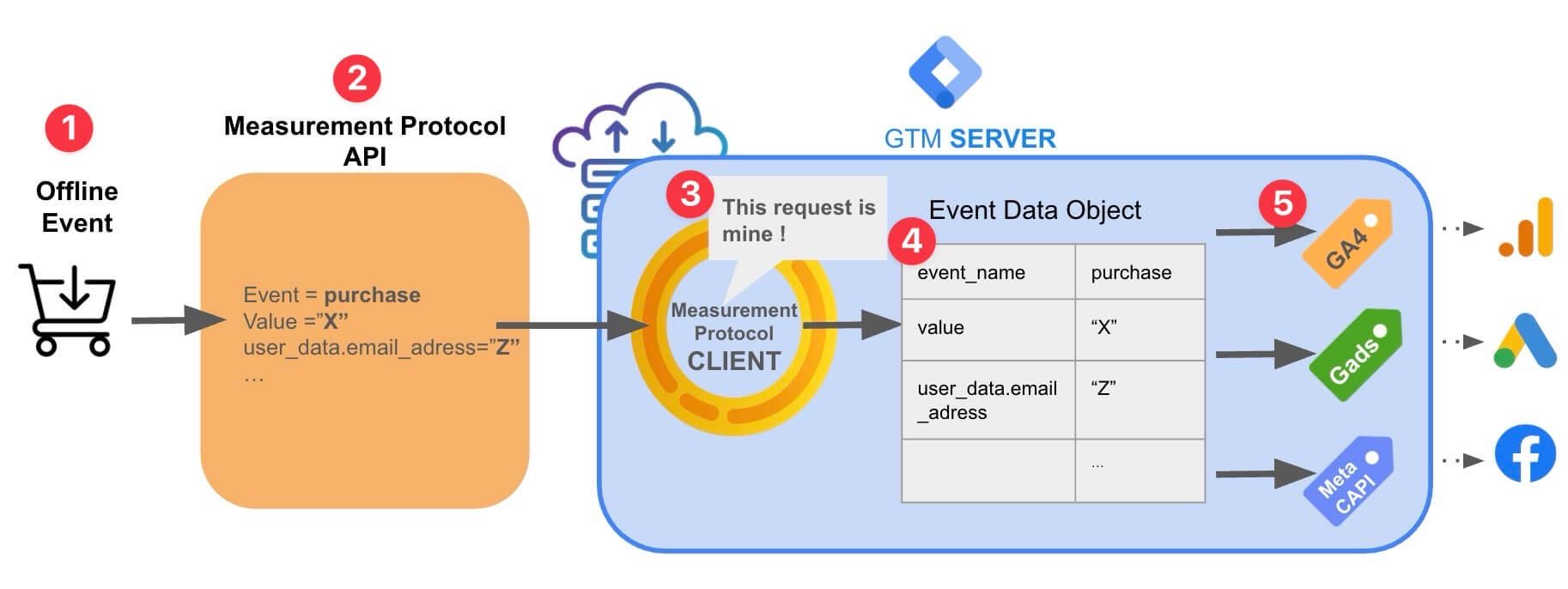
- GA4 Measurement Protocol
GA4 Measurement Protocol server-side events পাঠানোর একটি API-based mechanism।
Concept:
Backend ↓ Measurement Protocol ↓ GA4
Google-এর current documentation অনুযায়ী Measurement Protocol existing Google Analytics collection-এর complement হিসেবে কাজ করে; এটি browser tracking-এর সম্পূর্ণ replacement হিসেবে ভাবা উচিত নয়। (Google for Developers)
⸻
- Measurement Protocol Credential
GA4 web data stream-এর Measurement Protocol configuration থেকে API secret তৈরি করা যায়।
Architecture:
GA4 Property ↓ Web Data Stream ↓ Measurement Protocol ↓ API Secret ↓ Backend
Security
GA4 API secret:
Server-side secret
এটি public frontend code-এ রাখা উচিত নয়।
⸻
- GA4 Measurement Protocol Validation
এখানে একটি গুরুত্বপূর্ণ বাস্তব বিষয় আছে:
HTTP request সফল হওয়া মানেই event valid হয়েছে—এমন নয়।
Google-এর current documentation স্পষ্টভাবে Measurement Protocol validation server ব্যবহার করার recommendation দেয়। Validation endpoint /debug/mp/collect ব্যবহার করে request-এর সমস্যা শনাক্ত করা যায়, এবং validation server-এ পাঠানো events normal Analytics reports-এ যায় না। (Google for Developers)
Google আরও ENFORCE_RECOMMENDATIONS validation mode development/testing-এর সময় ব্যবহার করে সম্ভাব্য সমস্যা ধরার পরামর্শ দেয়। (Google for Developers)
⸻
- GA4 Validation Workflow
Developer ↓ Create Test Event ↓ Measurement Protocol Validation ↓ Validation Response ↓ Fix Errors ↓ Validate Again ↓ Production Endpoint
এই workflow production-এর আগে ব্যবহার করুন।
⸻
- GA4 DebugView
Browser-side event testing-এর সময় GA4 DebugView ব্যবহার করা যায়।
Flow:
Test Browser ↓ GA4 Event ↓ Debug Mode ↓ GA4 DebugView ↓ Event Parameters
DebugView-এ শুধু event এসেছে কিনা নয়, parameters-ও পরীক্ষা করা উচিত।
⸻
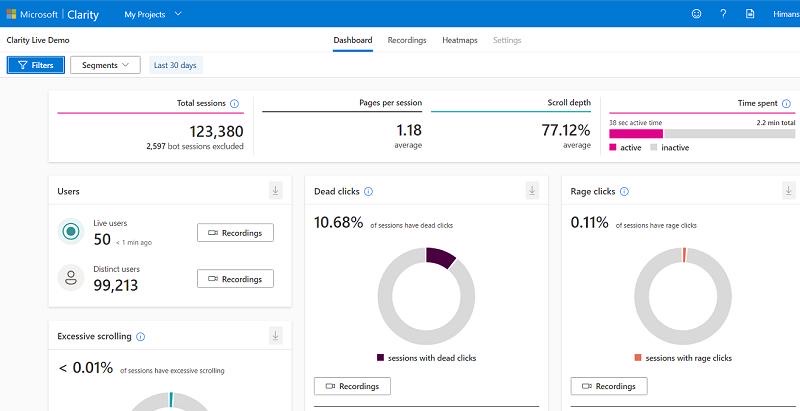
- Microsoft Clarity Setup
Microsoft Clarity behavioural analytics-এর জন্য।
এটি:
- session recordings
- heatmaps
- interaction analysis
- behavioural insights
এর মতো functionality দেয়।
Microsoft-এর current documentation অনুযায়ী Clarity project-এর tracking code manually, supported third-party platform বা NPM-এর মাধ্যমে install করা যায়। Installation verification-এর জন্য dashboard/recordings এবং network request দুটোই ব্যবহার করা যায়। (Microsoft Learn)
⸻
- Clarity Installation Verification
Developer Tools খুলুন।
তারপর website ব্যবহার করুন।
Network requests পর্যবেক্ষণ করুন।
Microsoft-এর documentation অনুযায়ী https://www.clarity.ms/collect-এ POST requests দেখা installation verification-এর একটি উপায়। (Microsoft Learn)
আরেকটি validation:
Website ↓ Test Session ↓ Clarity Dashboard ↓ Recording Appears
⸻
- Clarity Privacy & Masking
এই অংশটি কখনো বাদ দেওয়া উচিত নয়।
Clarity sensitive content default-ভাবে mask করে এবং Microsoft documentation অনুযায়ী masked content Clarity-তে upload করা হয় না। Input fields এবং dropdown content বিশেষভাবে masked থাকে। (Microsoft Learn)
তবুও website owner হিসেবে sensitive areas identify করে masking configuration review করা উচিত।
বিশেষভাবে:
- account information
- phone
- payment-related information
- private user data
- authentication-related interfaces
⸻
- Clarity Consent
Privacy requirements country এবং user context অনুযায়ী পরিবর্তিত হতে পারে।
Microsoft-এর current documentation অনুযায়ী EEA, UK এবং Switzerland-এর page visits-এর জন্য Clarity consent signal requirements enforce করা শুরু হয়েছে October 31, 2025 থেকে। (Microsoft Learn)
তাই global website হলে:
User ↓ Consent Management ↓ Tracking Decision ↓ Analytics Platforms
এই layer architecture-এর অংশ হিসেবে রাখা উচিত।
⸻
- Consent Architecture
Recommended:
             USER
               │
               ▼
         Consent Layer
               │
    ┌──────────┼──────────┐
    │          │          │
    ▼          ▼          ▼
  Meta        GA4      Clarity
Consent না পাওয়া অবস্থায় tracking behaviour platform-এর current policies এবং applicable privacy requirements অনুযায়ী configure করতে হবে।
একটি generic “GDPR compliant” claim করা উচিত নয়, কারণ compliance implementation-এর ওপর নির্ভর করে।
⸻
- Google Tag Manager কোথায় আসবে?
GTM একটি optional orchestration layer।
Architecture:
Website ↓ Google Tag Manager │ ├── GA4 ├── Meta Pixel └── Clarity
GTM useful যখন:
- marketing team tags manage করবে
- অনেক tracking vendor আছে
- event triggers centralized রাখতে হবে
- developer deployment কমাতে হবে
কিন্তু সব website-এ GTM বাধ্যতামূলক নয়।
⸻
- Direct Implementation বনাম GTM
Approach Advantage Limitation Direct code Maximum control Developer dependency GTM Easy tag management More abstraction Hybrid Best flexibility More architecture
Large production website-এর ক্ষেত্রে hybrid approach ভালো হতে পারে:
Business/marketing tags ↓ GTM Critical server-side conversions ↓ Backend
⸻
- Unified Event Mapping
এখন চারটি system একসঙ্গে map করি।
Business Action Internal Meta GA4 Clarity Page visit page_view PageView page_view Session Product view product_view ViewContent view_item Behaviour Search search Search search Behaviour Cart cart_add AddToCart add_to_cart Behaviour Checkout checkout_start InitiateCheckout begin_checkout Behaviour Purchase purchase Purchase purchase Behaviour Signup signup CompleteRegistration sign_up Behaviour Lead lead Lead generate_lead Behaviour
Clarity-এর ক্ষেত্রে প্রতিটি action-কে GA4/Meta-এর মতো revenue attribution event হিসেবে ভাবার প্রয়োজন নেই। এটি মূলত behavioural context দেয়।
⸻
- Complete Purchase Flow
এখন একটি real-world example দেখি।
User একটি product কিনলো।
Step 1
Product page:
view_item
Step 2
Cart:
add_to_cart
Step 3
Checkout:
begin_checkout
Step 4
Payment successful:
purchase
Backend:
Order status = PAID
তারপর server:
Meta CAPI → Purchase GA4 MP → purchase
Browser:
Meta Pixel → Purchase GA4 → purchase
এখানে browser/server event identity design করতে হবে যাতে duplicate conversion না হয়।
⸻
- Purchase Event Data
একটি ecommerce purchase-এর logical data:
Order ID Event ID Value Currency Items Quantity Product IDs Timestamp Page URL Environment
Example
Order ID: TEST-10001 Event ID: EVENT-TEST-10001 Value: 1500 Currency: BDT Environment: STAGING
এগুলো illustrative test values, কোনো real customer data নয়।
⸻
- Browser Validation
প্রথম validation browser-side।
Developer Tools খুলুন।
Check করুন:
Network Console Application
Verify
- tracking request হচ্ছে?
- correct endpoint?
- correct event?
- correct parameters?
- JavaScript errors আছে?
- consent state respected?
- staging environment ব্যবহার হচ্ছে?
⸻
- Server Validation
Backend logs-এ:
Incoming Event ↓ Validation ↓ Transformation ↓ Platform API ↓ Response
Monitor করুন:
- request accepted?
- authentication valid?
- payload valid?
- retry হয়েছে?
- timeout?
- rate limiting?
- duplicate?
⸻
- Platform Validation
Meta
Events Manager → Test Events
GA4
Realtime + DebugView
GA4 Measurement Protocol
Validation server/Event Builder
Clarity
Dashboard + Recordings + Network
⸻
- End-to-End Test Case
একটি test order তৈরি করুন।
TEST ORDER ↓ Product View ↓ Add Cart ↓ Checkout ↓ Purchase
Expected:
Meta
PageView ViewContent AddToCart InitiateCheckout Purchase
GA4
page_view view_item add_to_cart begin_checkout purchase
Clarity
Session Interaction Recording
⸻
- Validation Matrix
Check Expected PageView Received Product view Received AddToCart Received Checkout Received Purchase Received Event ID Present Purchase value Correct Currency Correct Browser event Present Server event Present Duplicate No unintended duplicate GA4 DebugView Visible CAPI validation Valid Clarity recording Available
⸻
- Common Meta Problems
Problem: Pixel event নেই
সম্ভাব্য কারণ:
- Pixel not loaded
- wrong ID
- JavaScript error
- consent blocking
- tag trigger incorrect
Debug
Browser ↓ Network ↓ Pixel request ↓ Events Manager
⸻
Problem: CAPI event নেই
সম্ভাব্য কারণ:
- backend request failed
- invalid credential
- incorrect endpoint
- invalid payload
- server timeout
- event not triggered
Backend logs first check করুন।
⸻
- Duplicate Purchase
এটি সবচেয়ে dangerous tracking problems-এর একটি।
Possible architecture:
Browser → Purchase Server → Purchase
যদি event identity এবং deduplication configuration সঠিক না হয়, reporting mismatch তৈরি হতে পারে।
Solution:
One Logical Purchase ↓ One Event Identity ↓ Browser + Server ↓ Deduplication
⸻
- GA4 Event Missing
Check:
- Measurement ID
- Data stream
- Tag firing
- Event name
- Consent
- Debug mode
- Browser network
- GA4 Realtime
- DebugView
⸻
- GA4 Measurement Protocol “Success” কিন্তু Data নেই
এখানে একটি common misconception আছে।
Measurement Protocol HTTP response দেখেই event valid ধরে নেওয়া উচিত নয়।
Google explicitly validation server ব্যবহার করার recommendation দেয় এবং বলে Measurement Protocol malformed/invalid event-এর ক্ষেত্রে সাধারণ HTTP error code না-ও দিতে পারে। (Google for Developers)
তাই development workflow:
Build ↓ Validate ↓ Fix ↓ Validate ↓ Production
⸻
- Clarity Recording নেই
Check:
- tracking code installed?
- correct project?
- website actually loaded?
- consent configuration?
- browser blocking?
- CSP?
- Network request?
- clarity.ms/collect request?
Microsoft-এর documentation অনুযায়ী installation verification-এর জন্য Clarity dashboard এবং network request দুটোই ব্যবহার করা যায়। (Microsoft Learn)
⸻
- Clarity Data Privacy Mistake
Clarity শুধু “install and forget” tool নয়।
Masking configuration review করুন।
Microsoft documentation অনুযায়ী masking changes future recordings-এ প্রভাব ফেলে এবং retroactively আগের recording-এর data পরিবর্তন করে না। (Microsoft Learn)
অর্থাৎ:
Privacy configuration launch-এর পরে নয়, launch-এর আগেই review করা উচিত।
⸻
- Production Deployment
Staging এবং production আলাদা রাখুন।
            Tracking System
                  │
          ┌───────┴───────┐
          │               │
       STAGING         PRODUCTION
          │               │
      Test Data        Real Data
      Test IDs         Real IDs
      Debugging        Monitoring
Production launch-এর আগে
- staging test complete
- API credentials verified
- event IDs verified
- consent tested
- privacy review complete
- duplicate detection complete
- analytics reporting checked
⸻
- Secret Management
Production credentials:
Secret Manager ↓ Environment Configuration ↓ Backend ↓ External API
Git repository:
Source Code │ └── No production secrets
যদি কোনো secret accidentally public repository-তে চলে যায়:
শুধু file delete করলেই নিরাপদ হওয়া যায় না।
Credential rotate/revoke করতে হবে।
⸻
- Monitoring
Production tracking deploy করার পর কাজ শেষ নয়।
Monitoring করুন:
Event Volume API Errors Duplicate Events Missing Events Latency Authentication Failures Conversion Drops
উদাহরণ:
Yesterday: 10,000 purchases Today: 2,100 purchases
এটি business drop হতে পারে—আবার tracking failure-ও হতে পারে।
তাই analytics monitoring এবং business monitoring আলাদা করে ভাবতে হবে।
⸻
- Tracking Health Model
একটি mature system-এ:
Business Event ↓ Browser Tracking ↓ Server Tracking ↓ Platform Receipt ↓ Analytics Reporting
প্রতিটি layer আলাদাভাবে যাচাই করা যায়।
⸻
- SEO এবং Tracking-এর সম্পর্ক
Tracking system SEO ranking signal নয়।
এটি খুব গুরুত্বপূর্ণ distinction।
Meta Pixel, CAPI, GA4 বা Clarity install করলেই Google Search ranking বাড়বে—এমন কোনো valid assumption করা উচিত নয়।
SEO-এর জন্য আলাদা বিষয় দরকার:
- crawlability
- indexability
- useful content
- internal linking
- canonical URLs
- structured data যেখানে appropriate
- page experience
- sitemap
- robots directives
Tracking এবং SEO দুটোকে একই website architecture-এর অংশ হিসেবে manage করা যায়, কিন্তু একটিকে আরেকটির ranking shortcut হিসেবে দেখা উচিত নয়।
⸻
- Sitemap
Website-এর technical SEO section-এ sitemap reference রাখা যেতে পারে।
SmartGen Tools Sitemap
SmartGen Tools XML Sitemap
এটি article-এর tracking implementation-এর অংশ নয়; বরং Technical SEO & Indexing Resources section-এ naturally রাখা উচিত।
Google Search Central sitemap documentation অনুযায়ী sitemap search engines-কে website-এর URLs discover করতে সাহায্য করতে পারে, তবে sitemap submission indexing guarantee করে না।
Google Search Central — Build and Submit a Sitemap
⸻
-
Security Checklist
-
API secrets server-side
- No secrets in Git
- No secrets in frontend
- HTTPS enabled
- Staging credentials separated
- Production credentials protected
- Sensitive user data minimized
- Consent mechanism implemented where required
- Clarity masking reviewed
- Payment information never sent unnecessarily
- Authentication data never sent to analytics
- Server logs do not expose secrets
- Error logs sanitized
⸻
- Complete QA Checklist
Meta Pixel
- Pixel ID correct
- Base event received
- PageView working
- Important events working
- Parameters correct
- Test Events verified
Meta CAPI
- Dataset/Pixel correct
- Server credential configured
- Event payload valid
- Event ID generated
- Browser/server mapping correct
- Deduplication verified
- Error logging available
GA4
- Property created
- Web stream created
- Measurement ID correct
- Events working
- Parameters working
- Realtime verified
- DebugView verified
- Key Events configured
GA4 Measurement Protocol
- API secret generated
- Secret server-side
- Test event created
- Validation server used
- Invalid parameters fixed
- Production endpoint separated
Clarity
- Project created
- Tracking installed
- Network request verified
- Recording verified
- Masking reviewed
- Consent behaviour reviewed
⸻
- Recommended Development Workflow
একটি production-grade implementation এই order-এ করুন:
- Business Requirements ↓
- Tracking Plan ↓
- Event Schema ↓
- Sandbox ↓
- Meta Pixel ↓
- Meta CAPI ↓
- Deduplication ↓
- GA4 ↓
- Measurement Protocol ↓
- Clarity ↓
- Consent ↓
- Validation ↓
- QA ↓
- Production ↓
- Monitoring
⸻
- What Not to Do
❌ শুধু Pixel install করে ভাববেন না tracking complete
❌ Browser এবং server একই conversion আলাদা event হিসেবে পাঠাবেন না
❌ API secret frontend-এ রাখবেন না
❌ Production-এ test orders করবেন না
❌ GA4 request accepted হলেই valid ধরে নেবেন না
❌ Clarity masking review বাদ দেবেন না
❌ Consent requirements ignore করবেন না
❌ Fake analytics data দিয়ে implementation success claim করবেন না
❌ Tracking data এবং business database-এর মধ্যে কোনো identity strategy ছাড়া architecture বানাবেন না
⸻
- The Most Important Architecture Principle
একটি ভালো tracking system-এর foundation হলো:
          BUSINESS EVENT
                │
                ▼
         INTERNAL EVENT
                │
    ┌───────────┼───────────┐
    │           │           │
    ▼           ▼           ▼
  META         GA4       CLARITY
    │           │
    ▼           ▼
  CAPI         MP
অর্থাৎ:
Platform-first tracking নয়।
প্রথমে:
Business event model
তারপর:
Platform mapping
এটি architecture-কে maintainable করে।
⸻
- Example: Lead Generation Website
Ecommerce না হলেও একই architecture ব্যবহার করা যায়।
User:
Landing Page ↓ Service Page ↓ Contact Form ↓ Lead Submitted
Internal:
lead_submitted
Meta:
Lead
GA4:
generate_lead
Clarity:
Form interaction
Backend:
Lead ID
এইভাবে ecommerce-এর বাইরে SaaS, agency, education website, service website বা landing page-এও architecture ব্যবহার করা যায়।
⸻
- Example: SaaS Website
Visitor ↓ Pricing Page ↓ Start Trial ↓ Account Created ↓ Subscription
Internal events:
pricing_view trial_started signup_completed subscription_created
Meta/GA4-এ relevant mappings করা যাবে।
এখানে backend event বেশি authoritative:
Subscription ↓ Payment confirmed ↓ Backend ↓ Server-side conversion
⸻
- How to Know Your Setup Is Actually Successful
“Script installed” ≠ successful tracking.
A successful setup means:
                EVENT
                  │
      ┌───────────┴───────────┐
      │                       │
   Browser                  Server
      │                       │
   Platform                Platform
      │                       │
      └───────────┬───────────┘
                  │
              Validation
                  │
             Correct Data
                  │
             No Duplicate
                  │
             Privacy Safe
                  │
             Production Ready
এই পাঁচটি condition পূরণ না হলে implementation complete বলা উচিত নয়:
- Delivery
- Correctness
- Deduplication
- Privacy
- Observability
⸻
- Official Documentation
এই guide-এর implementation করার সময় third-party blog-এর পরিবর্তে প্রথমে official documentation ব্যবহার করুন।
Meta
Meta Business Help Center — Conversions API
Meta Help Center — Pixel and Conversions API
Google Analytics
Google Analytics — Measurement Protocol Reference
Google Analytics — Validate Events
Google Tag — Official Documentation
Microsoft Clarity
Microsoft Clarity — Setup & Installation
Microsoft Clarity — Masking Content
Microsoft Clarity — Documentation
Google Search
Google Search Central — Sitemaps
SmartGen
SmartGen Tools Sitemap
⸻
- Frequently Asked Questions
Should I use Meta Pixel and Conversions API together?
For many Meta advertising implementations, using browser-side Pixel together with server-side CAPI is a common architecture. The important part is implementing event identity and deduplication correctly rather than simply sending the same event twice.
Is Conversions API a replacement for Pixel?
Not necessarily. Browser and server-side collection serve different purposes and can complement one another.
Should GA4 Measurement Protocol replace GA4 browser tracking?
No. Measurement Protocol is designed to complement existing collection mechanisms rather than simply replace them. (Google for Developers)
How do I test GA4 server events?
Use Google’s Measurement Protocol validation server/Event Builder during development. Google specifically recommends validation before production. (Google for Developers)
Why is my Clarity recording missing?
Check installation, project ID, consent configuration, browser behaviour and the clarity.ms/collect network request. (Microsoft Learn)
Does Clarity mask sensitive information?
Clarity masks sensitive content by default, and masked content isn’t uploaded to Clarity. Nevertheless, site owners should review masking configuration for their specific application. (Microsoft Learn)
Do I need Google Tag Manager?
No. GTM is optional. Direct implementation and GTM-based implementation both have valid use cases.
Is server-side tracking automatically privacy compliant?
No.
Server-side tracking changes where data is collected and transmitted; it does not remove privacy obligations.
Does installing analytics improve SEO rankings?
Analytics installation itself should not be treated as an SEO ranking strategy.
⸻
- Final Production Checklist
Before declaring the tracking implementation complete:
- Business events defined
- Tracking specification documented
- Internal event names defined
- Meta mapping defined
- GA4 mapping defined
- Clarity behaviour defined
- Staging environment created
- Meta Pixel installed
- Meta events tested
- CAPI configured
- Server credential secured
- Event IDs implemented
- Browser/server deduplication tested
- GA4 configured
- GA4 events verified
- Measurement Protocol configured where required
- Measurement Protocol validation completed
- Clarity installed
- Clarity recording verified
- Clarity masking reviewed
- Consent implementation reviewed
- Production credentials separated
- Browser QA completed
- Backend QA completed
- Platform QA completed
- Monitoring configured
- Privacy documentation reviewed
- Sitemap available
- Technical SEO reviewed
- Production launch completed
- Post-launch events monitored
⸻
Conclusion
A professional analytics implementation is not:
“Install Pixel + GA4 + Clarity.”
It is an event architecture.
The correct mental model is:
Business Action ↓ Internal Event ↓ Browser + Server ↓ Platform Mapping ↓ Deduplication ↓ Validation ↓ Privacy ↓ Production Monitoring
Meta Pixel gives you browser-side Meta event collection.
Meta Conversions API provides a server-side event path.
GA4 provides broader analytics and reporting.
GA4 Measurement Protocol allows appropriate server-originated events to be collected.
Microsoft Clarity provides behavioural context through features such as recordings and heatmaps.
But the quality of the final system depends less on how many scripts you install and more on whether the event model, identity, data quality, validation, privacy and monitoring architecture are correct.
That is the difference between a website that merely has analytics scripts and a website with a production-grade measurement system.